Paying your municipal bills on time is essential to avoid penalties and service interruptions. The City of Johannesburg has streamlined this process with e-Joburg, a secure digital platform that enables residents to manage and pay their bills online.
This guide will show you how to use e-Joburg effectively, explain the benefits, and answer common questions.
What Is e-Joburg?
e-Joburg is the City of Johannesburg’s official online portal for residents to view, manage, and pay municipal accounts. The platform supports payments for water, electricity, rates, and refuse.
It offers a fast, reliable, and secure alternative to third-party payment platforms or standing in queues at municipal offices.
ALSO READ: Electricity Tariffs in Ekurhuleni Explained: What Residents Will Pay and How to Manage Costs in 2026
Why Use e-Joburg for Bill Payments?
Using e-Joburg directly benefits both residents and the City. Here’s why:
- Instant processing: Payments reflect immediately in the City’s bank account.
- Avoid service interruptions: Real-time referencing eliminates delays and misallocations.
- Cost-effective: Helps the City reduce administrative and reconciliation costs.
- Secure payments: Backed by the Payments Association of South Africa (PASA).
- Convenient access: Proof of payment is stored online—no paper receipts needed.
How to Register on e-Joburg
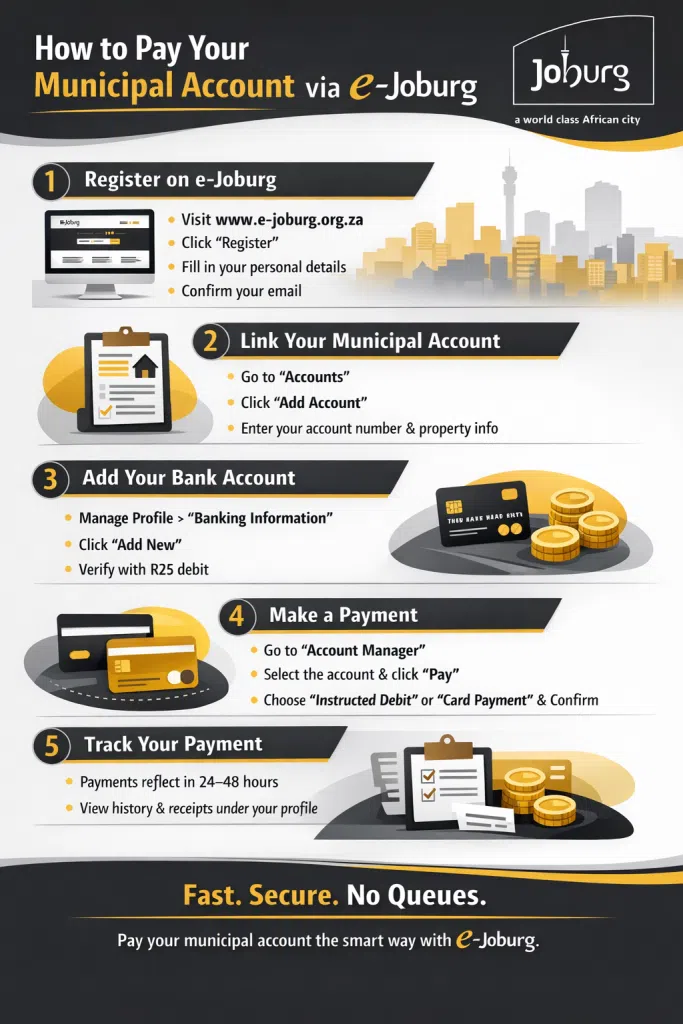
Before you can pay your municipal bills, you must register an account:
- Go to www.e-joburg.org.za.
- Click on “Register”.
- Provide your personal and contact information.
- Create a secure password.
- Verify your account via email.
Once verified, you can log in and begin managing your account.
Adding Your Municipal Account
After registration, link your municipal account:
- Click on “Accounts” in the dashboard.
- Select “Add Account”.
- Enter your municipal account number and property details.
- Click “Submit” to save.
You can now view your billing history, current balances, and payment options.
How to Add a Bank Account to e-Joburg
To use the Instructed Debit method, first add a bank account:
- Go to “Manage Profile”.
- Click on “Banking Information”.
- Select “Add New”.
- If the bank account doesn’t belong to you, tick the relevant box.
- Enter your banking details and submit.
If the account is not in your name, a R25 verification payment will be processed. This payment appears on your bank statement with a PIN to complete the verification.
Allow up to 48 hours for verification.
How to Use e-Joburg to Make a Payment
Follow these simple steps to pay your bill:
- Click on “Account Manager”.
- Select the account you want to pay.
- Click “Pay”.
- Choose “Instructed Debit” as the payment type.
- Select the bank account.
- Choose a pay-by-date (can be future dated).
- Confirm by clicking “Pay”.
Funds are typically processed within 24–48 hours. Once cleared, your municipal account is updated automatically.
e-Joburg Payment Options
e-Joburg accepts:
- Credit or debit cards (Mastercard and Visa supported)
- Instructed debit from any South African bank
- EFT (available through banking integration)
All payments are processed via secure gateways that comply with South African banking regulations.
Advantages Over Third-Party Payment Services
While many residents still use banking apps or supermarket tills to pay bills, these methods can cause delays:
- Payments may take 2–3 days to reflect.
- Incorrect referencing can result in misallocated payments.
- Proof of payment is often difficult to trace.
Using e-Joburg eliminates these issues entirely. It ensures real-time referencing and instant proof of payment—all in one system.
ALSO READ: How to Use the City of Ekurhuleni’s Siyakhokha Portal
Common Issues and How to Fix Them
Problem: Bank verification failed
Solution: Ensure the R25 payment has cleared and check your bank statement for the PIN. Enter it under banking info.
Problem: Payment not reflecting
Solution: Wait 48 hours. If the issue persists, contact e-Joburg support with your proof of payment.
Problem: Can’t add municipal account
Solution: Double-check your municipal account number and ensure the details match City records.
Is e-Joburg Safe?
Yes. e-Joburg is backed by trusted institutions:
- Member of PASA (Payments Association of South Africa)
- Partnerships with all major banks, Visa, and MasterCard
- Secure payment gateways with SSL encryption
This means your financial and personal data is protected at all times.
FAQs About Using e-Joburg
Can I schedule future payments?
Yes. The system allows for future-dated instructed debit payments.
Is there a mobile app for e-Joburg?
Currently, e-Joburg is accessible via its mobile-friendly website, but no standalone app exists.
What happens if I stop a payment?
Cancelled or reversed payments may lead to service disconnection or penalties. Contact support immediately if there’s a problem.
Embrace Digital Billing with e-Joburg
Switching to e-Joburg is a win for both residents and the City of Johannesburg. It’s a faster, safer, and more transparent way to manage your municipal accounts. By using this platform, you reduce payment errors, support improved service delivery, and gain peace of mind.
Try it today at www.e-joburg.org.za.