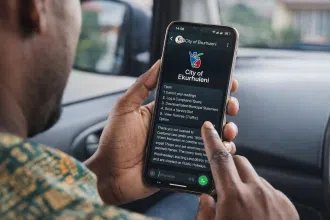
The Siyakhokha Portal is the City of Ekurhuleni’s official online service platform. It allows residents, businesses, and government users to manage their municipal accounts with ease. Whether you’re paying your utility bill, checking your statement, or logging a service complaint, Siyakhokha offers a secure, convenient way to interact with the City—24/7.
Let’s explore how to use the Siyakhokha Portal, step-by-step, and why it’s changing the way residents manage their municipal services.
What is the Siyakhokha Portal?
The Siyakhokha Portal is a digital platform created by the City of Ekurhuleni to simplify service delivery. It allows users to:
- View and pay municipal accounts online
- Access payment history and consumption details
- Lodge complaints or compliments
- Update personal and banking details
It’s available to both individual residents and businesses, and aims to reduce queues, save time, and promote paperless billing.
ALSO READ: Gauteng e-Panic Button App Gains Popularity Among Users
Why Use Siyakhokha?
Siyakhokha offers a host of benefits, including:
- 24/7 Access: No more waiting in long queues or visiting municipal offices.
- Secure Payments: Backed by encrypted technology and verified certificates.
- Instant Notifications: Get statements and payment confirmations electronically.
- Full Transparency: Access to payment and billing history at your fingertips.
- Eco-Friendly: Go paperless and help reduce the City’s carbon footprint.
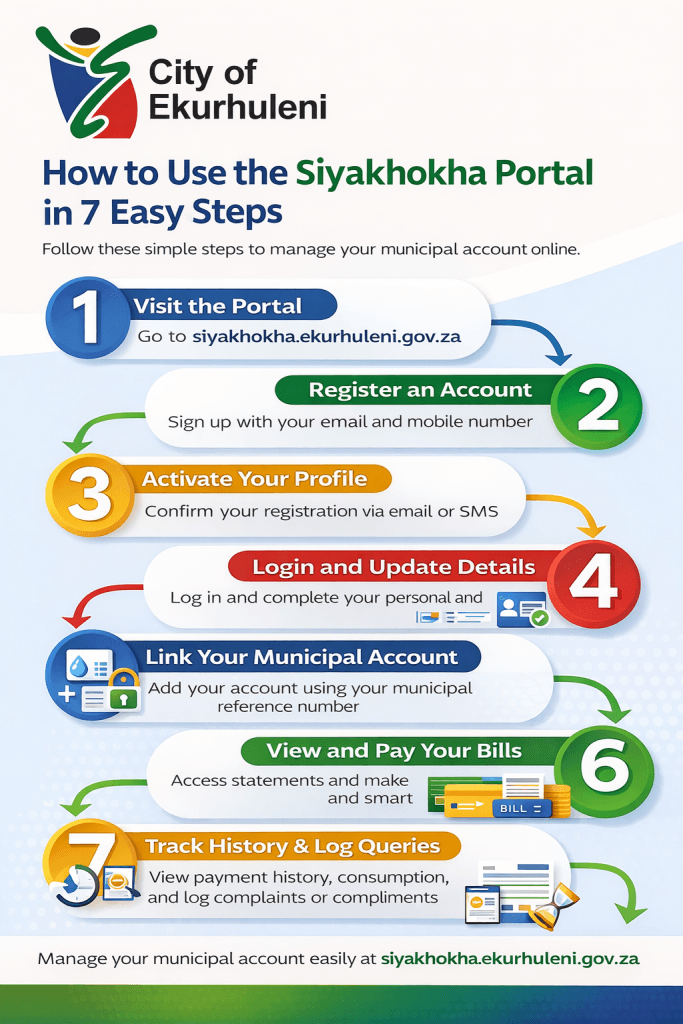
Step 1: Access the Siyakhokha Website
Start by visiting the official Siyakhokha site at
https://siyakhokha.ekurhuleni.gov.za
Make sure you see the “https://” and the lock symbol in your browser’s address bar. This confirms you’re on the secure site.
Step 2: Register on the Siyakhokha Portal
To use the portal, you’ll need to register:
- Click on “Register”
- Enter your personal or business details
- Provide a valid email and cellphone number
You’ll receive an activation link via email or an SMS code to confirm your registration.
Step 3: Login and Update Your Profile
Once registered:
- Log in using your email and password
- Navigate to the profile section
- Add or update your personal and banking information
Keeping your details updated ensures accurate billing and communication.
Step 4: Link Your Municipal Account
To manage your municipal services, link your account:
- Use your municipal account number (found on your physical statement)
- The system will fetch your account details
- You can link multiple accounts if you own several properties
Step 5: View Your Municipal Statements
Once your account is linked, you can view:
- Monthly municipal statements
- Previous statements and account history
- Outstanding balances and due dates
This makes it easier to track your household’s utility usage and plan payments.
Step 6: Make Secure Payments
The Siyakhokha Portal supports multiple payment options:
- Once-Off Payment using credit or debit card
- Recurring Debit Orders for hassle-free payments
- Masterpass, Standard Bank MyBills, and Nedbank My eBills
Payments made on the site are processed securely and confirmed instantly. However, note that payments through online banking may take up to 48 hours to reflect.
Step 7: View Consumption (Water/Electricity)
Track your utility usage under the “Consumption” section:
- View current and previous month’s water and electricity usage
- Monitor unusual spikes or drops in usage
- Compare trends month-by-month
This helps identify leaks or high usage and manage consumption efficiently.
Step 8: Log a Complaint or Compliment
Got a service issue or wish to praise a staff member?
- Use the complaints section to log issues related to billing, service delivery, or technical faults.
- Registered users must be logged in to submit queries.
- Each complaint is linked to your account for better tracking.
Compliments are also encouraged—positive feedback helps improve services!
Step 9: View Your Payment History
Stay organised with Siyakhokha’s full payment history feature:
- See all your past transactions
- Download receipts and statements
- Filter payments by date range
This is especially useful for businesses and landlords managing multiple accounts.
Step 10: Use Siyakhokha as a Business or Government User
The platform isn’t only for residents. Businesses and government entities benefit from:
- Bulk account management
- Reconciled invoicing
- Paperless statements
- Faster turnaround on service queries
The platform’s scalability makes it ideal for large property managers or institutions.
How Safe is the Siyakhokha Portal?
Security is a top priority. Here’s how the Siyakhokha Portal keeps your data safe:
- Site is secured by Thawte Consulting cc
- SSL encryption for every session
- Only accessible via https:// for added protection
- Users can see the padlock icon in the browser, confirming secure access
Make sure you always access the portal through the official URL to avoid phishing sites.
Frequently Asked Questions (FAQs)
Is Siyakhokha free to use?
Yes, registering and using the Siyakhokha Portal is completely free.
Can I pay someone else’s municipal bill?
Yes, as long as you have their account number and permission to manage the account.
Can I access Siyakhokha on mobile?
Yes, the website is mobile-responsive and works on smartphones and tablets.
What happens if my payment doesn’t reflect?
Payments via online banking may take up to 48 hours. Use the payment history section to track it.
Embrace Smart Service Delivery
The Siyakhokha Portal isn’t just a convenience- it’s a shift toward smarter, more transparent governance in the City of Ekurhuleni. From paperless billing to faster query resolutions, the platform empowers residents and businesses alike.
If you haven’t registered yet, now is the time. Embrace the future of service delivery and say goodbye to queues and missed payments.